Arctic Fox Installation Instructions for the Eleaf Pico 75w

Arctic Fox for Eleaf Pico 75w
Free firmware installation guide for Arctic Fox on the Eleaf Pico 75w. Unlock temperature control, autofire, and custom TCR profiles for Divine Tribe atomizers.
🚚 Free USA Shipping
🛡️ 1-Year Guarantee
🇺🇸 American-Owned Since 2013
- Over 18,000 orders shipped
- Shipped to over 40 countries
- 1 year warranty on battery devices
- Every part sold separately
Support from Humboldt County, California since 2013. Why Divine Tribe
Update the Firmware
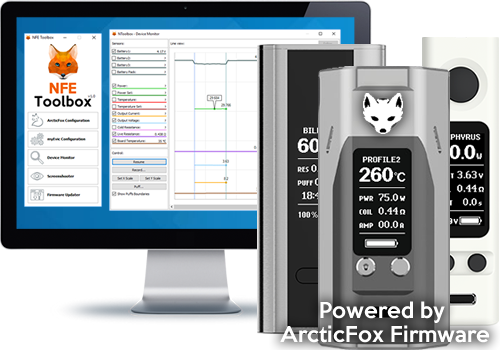
In nToolbox, click Update From a File, select the Arctic Fox (or Autofire) BIN file, and upload it to your Pico. ✅
Load the Configuration
Use our pre-set configuration with 3 profiles for the Quest, v4, and v5 Prototype — or customize your own with these instructions.
In nToolbox, click ArcticFox Configuration, select the file, and click Upload Settings. Cycle between profiles by pressing the fire button 3 times. 🔄
Enjoy Autofire
🌿 Divine Tribe Arctic Fox Instructions © 2025 — Powered by Community 🌿
#ArcticFox #EleafPico #DivineTribe #VapingFirmware #CustomVape
#ArcticFox #EleafPico #DivineTribe #VapingFirmware #CustomVape
Arctic Fox’s autofire lets you heat for up to 60 seconds with a double-click — no need to hold the button every 10 seconds like stock firmware. Perfect for Divine Tribe atomizers! 🌿
Join Divine Tribe
Everything on this page ships free inside the USA.
Only logged in customers who have purchased this product may leave a review.



Reviews
There are no reviews yet.